
Apple Thoughts - News & Reviews on all things Apple

Be sure to register in our forums and post your comments - we want to hear from you!


Android Thoughts

Loading feed...

Laptop Thoughts

Loading feed...

Digital Home Thoughts

Loading feed...


All posts tagged "genius bar"


Monday, November 8, 2010

Apple Memo Reveals Dead Pixel Policy

Posted by Joe Johaneman in "Apple Talk" @ 07:30 AM

http://www.tuaw.com/2010/11/05/appl...ree-for-ipad-g/

"Our friends at Boy Genius Report gave the lowdown Wednesday on an internal Apple document that specifies exactly how many bad pixels must appear on a device before it is considered to be 'out of spec.' There are a number of thresholds that depend on the display size and the density of the anomalies. For displays up to 3.5 inches, which includes all iPods and iPhones, no bad pixels will be tolerated; even a single instance gets you an automatic replacement. "
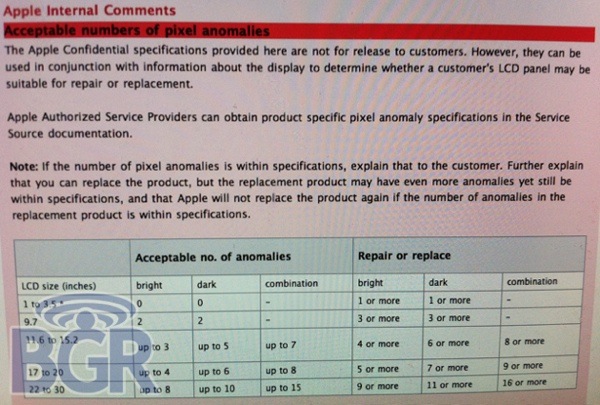
Apparently, this is just a recommendation to Genius Bar employees on when a display (or a device with an LCD display) can be replaced due to dead pixels. The interesting thing is: If you have dead pixels on a largish screen, you can get it replaced, no matter how many dead pixels it has, but if you get a replacement with more dead pixels, you can't replace it for free again as long as the number of dead pixels are within spec. Has anyone come across this policy at their local genius bar?



Tuesday, May 26, 2009

Time For The Genius Bar? Here Are Some Tips..

Posted by Jeff Campbell in "Apple Articles & Resources" @ 10:00 AM

http://www.macworld.com/article/140...l?lsrc=rss_main

"If you work your way through the quick fixes and my other troubleshooting suggestions without success, you'll exhaust your patience. This can easily happen if your Mac's problem lies with its hardware-in most cases, you can't do those repairs yourself. More rarely, you might have a software problem that you can't figure out, despite your best efforts. In either case, the time has arrived for a trip to the Genius Bar."

Just a few tips, mostly basic stuff such as make an appointment and check your warranty, but it never hurts to be prepared. The big one though is make sure its an Apple problem, not a third-party problem. But if you are in doubt, bring it in and if it isn't an Apple problem, they can direct you to the right place.


Featured Product
News Tip or Feedback?

Contact us

Other Apple Resources

All iOS News

iPhone Life

Thoughts Media Sites

Windows Phone Thoughts

Digital Home Thoughts

Zune Thoughts

Apple Thoughts

Android Thoughts

Reviews & Articles

Loading feed...

News

Loading feed...

Reviews & Articles

Loading feed...

News

Loading feed...

Reviews & Articles

Loading feed...

News

Loading feed...

Reviews & Articles

Loading feed...

News

Loading feed...

Reviews & Articles

Loading feed...

News

Loading feed...

Sponsored links